Still needs some work and testing, but it’s coming along
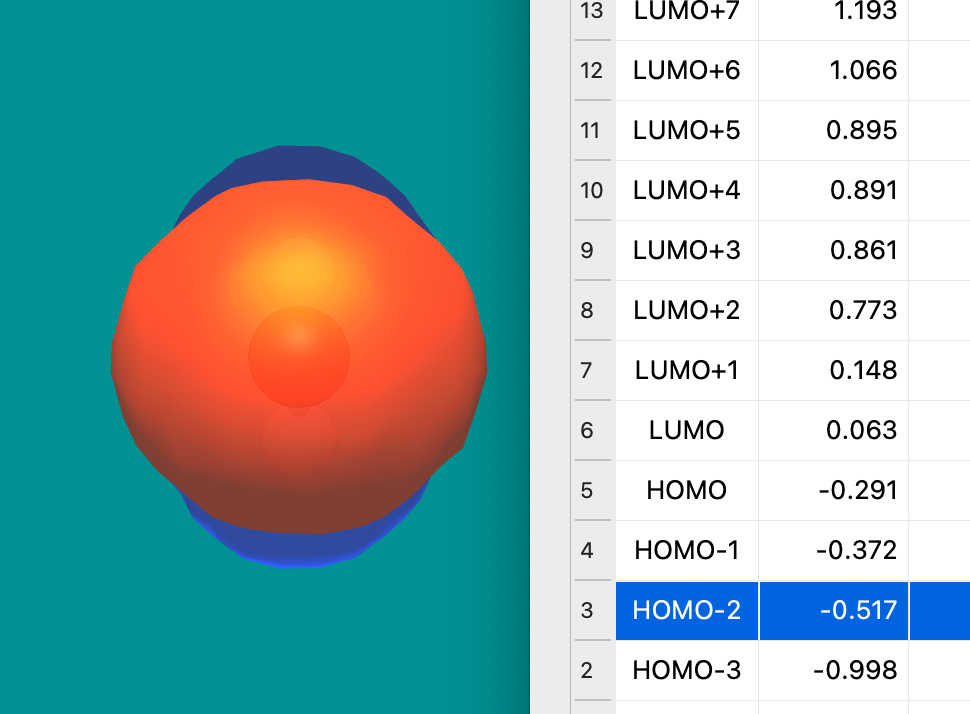
One key question is whether to keep the header / MO index column (e.g., MO 5 is the HOMO). Thoughts?
Still needs some work and testing, but it’s coming along
One key question is whether to keep the header / MO index column (e.g., MO 5 is the HOMO). Thoughts?
Fantastic!
I’ll see if I can give it a spin in the next few days.
Personally I’d prefer simply listing the occupancies of the orbitals rather than trying to assign HOMO/LUMO descriptions to them, as I find that when doing open-shell calculations, especially unrestricted ones, the description often ends up being misleading or confusing or inaccurate.
(Partly because of alpha/beta having different occupancies, partly because people understand “HOMO” to mean different things in an odd-electron system, partly because the alpha and beta orbitals can’t always be trivially and automatically paired up.)
Right now, it works only for closed-shell (which was Avo 1.2) and I’d like to keep HOMO / LUMO for that common case.
I’m inclined to merge that for 1.100 even if it doesn’t fully handle unrestricted cases.
We have to think carefully about how the “table” should work for open-shell systems.
My gut tells me there should be a column for alpha and a column for beta and you have to click on a cell (rather than a row) for a given spin orbital. So there would be four columns and probably no “status” column.
But yes, the labels would be different for an open-shell calculation. Probably something like “α MO 5 •” or “β MO 10 o”
Definitely open to suggestions for those labels / emoji. Should we use ↿ ⇂ or ↑ ↓ instead to show occupancies?
Ok I’ve had a chance to look at the new window now so I have some more fully-formed thoughts. Great work on getting it ported, looks like it wasn’t trivial 
Firstly, the rendering status indicator:
0 when nothing is loaded – 0% would be better100 % which most people will find weirdSomething else is that I can’t tell from the code how the HOMO is being determined. Is it based on orbitals.electronCount in the CJSON representation? Because this has the issue that the labels are wrong if the orbital set is not complete.
For example, I’ve attached a CJSON produced by xtb and my plugin for acetone. Since xtb only returns (and calculates too?) the “valence” orbitals, there are only 22 MOs with 22 electrons, even though the electron count is 72. This results in Avogadro labelling all the MOs as being way below the HOMO, which is incorrect.
Is there a orbitals.occupancies field in CJSON that should be used?
acetone.cjson (204.9 KB)
But it did work for open-shell too? I used it for years for precisely that.
IIRC, it only shows the alpha orbitals. Which should be what the current code does.
I’m open to better ideas. Before there was a little progress bar, but that particular feature wasn’t working well - it wouldn’t render in each cell, only in the upper left corner obscuring the table. So I disabled the progress bar for now.
Sure, no worries.
Yeah, that’s why there was previously a progress bar. I think I mentioned in the commit log that it wasn’t working. That would be the better solution, but I wanted to get something finished for testing and string translation rather than continue to fiddle with the progress bars.
RIght now, the BasisSet::homo() and lumo() calls are used, which go on the electron count. Yes, it probably should work it out based on the occupations (and also distinguish alpha and beta spin orbitals).
Yes, occupations for closed-shell and alphaOccupations and betaOccupations for open-shell.
Some of the code is more-or-less identical. Some required some minor tweaks. There were a few crashy bugs that were annoying. Pretty sure I got those fixed at this point.
I also just got a chance to put this thing through my typical round of tests, and I have to say it looks pretty good, with a few interesting bugs that I’ve noticed.
Also, in a matter of personal preference, I would rather the orbital table be displayed only by selection, and not automatically upon opening an output. There’s also the matter of getting the window to dock like it used to in Av1 (I may be remembering that wrong, but I think it did), although that seems like its own headache, and the window works well enough as-is.
As a suggestion, it might be nice to be able to set a default render quality. I use a pretty beefy computer for almost everything, and it most certainly can handle rendering all the orbitals at High or Very High quality, so it would be nice if I could make that the default for new files.
That’s weird. Can you post or send me that file?
A couple of those bugs are fixed in this pull request although sometimes I also get the render button to stop working … and I haven’t tracked that particular chain-of-events down.
Yeah, I haven’t gotten into the “dock” bits of Qt yet. OTOH, there were a bunch of “bug” reports complaining the orbital window didn’t open when loading a file. It seems like the “auto-open” docks were very popular in Avogadro 1.2.
At the moment, I haven’t bothered with the settings dialog for a few options like default render quality and how many orbitals to pre-calculate - mostly because it’s a lot of new strings to translate and I’d like to release 1.100. (I know some of the translators really want to be at 100% for every release.)
The file is too big (even when compressed) to attach here, but hopefully this link works so that you can download it. Hopefully it isn’t too big of a bug to fix!
Also, just as a note, the release of 1.100 might be a good time to redirect searches for Avogadro to be to the Avogadro 2 page. Avogadro 1 is definitely not the best foot to put forward with the state that it is in, and Avogadro 2 is nearing complete parity. I think it would be good to get things moving in the right direction, perhaps just a big header on the Av1 page that shows up to try and push people towards Av2 would be a good start.
That was actually very interesting. First off it was parsing orbital energies and then clearing them?! Fixed that, then realized ORCA doesn’t print all the LUMO energies and I could get them elsewhere in that file (i.e., with the MO coefficients).
That led me to realize the regex used to parse MO coefficients (from the ORCA-enhanced Avogadro 1.2) was really buggy on your file. I’ll skip the details, but for anyone reading, be very, very careful with testing your regex.
Yeah, I was thinking along similar lines. Obviously the https://two.avogadro.cc site needs work, but I can see there are ~50 searches a day on the forum for problems with Avogadro 1.2.
I’ve found another bug w.r.t the orbital window/rendering. Using the same file I linked earlier, if you click and drag on the orbitals quickly, Av2 just up and crashes. I’ve tried the rapid click and drag as opposed to just holding the arrow up key and both result in a crash. It seems to be something is up with rapidly requesting new renders, but I am not sure.
In an attempt to gain some more information, I monitored Av2 with the visual studio debugger while I did this, and got the following error message right before the crash:
Exception thrown at 0x00007FF8EC52FA4C in avogadro2.exe: Microsoft C++ exception: std::bad_array_new_length at memory location 0x0000004035FFF5F0.

Unhandled exception at 0x00007FF8ECC8F6FE (ucrtbase.dll) in avogadro2.exe: Fatal program exit requested.
The actual thing at the memory location it gave, 0x00007FF8ECC8F6FE, was this:

I’m not entirely sure if this helps at all, but I figured I’d try out some new things to maybe learn a bit more about how to debug better.
I’ve hit that once or twice. It seems like some sort of race condition (i.e., requesting a new render very quickly before the previous mesh is finished).
I think on Windows, to debug you need the debugging symbols. I don’t know the best way to handle that in Visual Studio, but maybe this is helpful? Configure CMake debugging sessions in Visual Studio | Microsoft Learn
The problem with this particular kind of bug is that debuggers often don’t provide much useful information.
Right now, the code sets up a queue for the cubes, and when you click on a particular orbital, it generates the meshes on-the-fly because it’s fast (with the new flying edges) and because the render type currently only handles up to 2 meshes per molecule.
So my guess is that the code is starting a mesh, then you request a new mesh before it’s finished. There should be a bit more “defensive” code in there (i.e., to detect a mesh is in progress before requesting the next one … and switching to a queue for mesh generation like for the cube code).
Yeah, those need to be generated during the build in the form of a bunch of .pdb files. That’s why I’ve been focused on getting the debug version to build lately. So far the only thing I can tell with the debugging mode that I’ve used is just what DLL file had the error, but without the .pdb files I couldn’t see what .cpp file it originated from.
I’ve noticed a lot lately that Av2 has some little bugs that result in just a forced exit, no error messages or anything, just crash. I don’t quite remember if it exists already, but is there a place that Av2 will dump information when it crashes?
That would be disappointing. This particular crash was my fault - basically not making the mesh creation lock / unlock properly. That’s called a race condition. Should be fixed now.
I’d be happy to start a separate thread if there’s a real need for a crash collection system. The current “best” option seems to be Chromium’s Crashpad library, which also needs a server repository to get the logs, and it presents privacy issues.
As a side note, I’ll see what I can do about a Debug version for Windows soon.
If you have a chance, I’d love to know if that pull request fixes your mesh crashing issues. Looks pretty solid to me in initial testing. 
It absolutely works, no crashes on that front! I think with that fix the molecular orbital window seems to be working quite well.
I think for the crash collection it doesn’t really need to be a log collection thing, but if I can take a look at any logs that get output on my own or provide them when a crash occurs that would be great.
I am very excited for this, should make bug hunting much easier on my end!
Hi everyone,
I am not quite sure, what I have to do in order to view this nice orbital table in Avo2. I’ve created a MO cube file and when I open this in Avo1 the table appears (probably because it automatically reads the gbw file and creates the other MOs?), but in Avo2 only the cube file, which I loaded is shown, no table is generated.
OS = Win 11
Avogadro 1.102
Cube files generated with orca_plot
There are a few other things that I noticed which refers also to an earlier discussion:
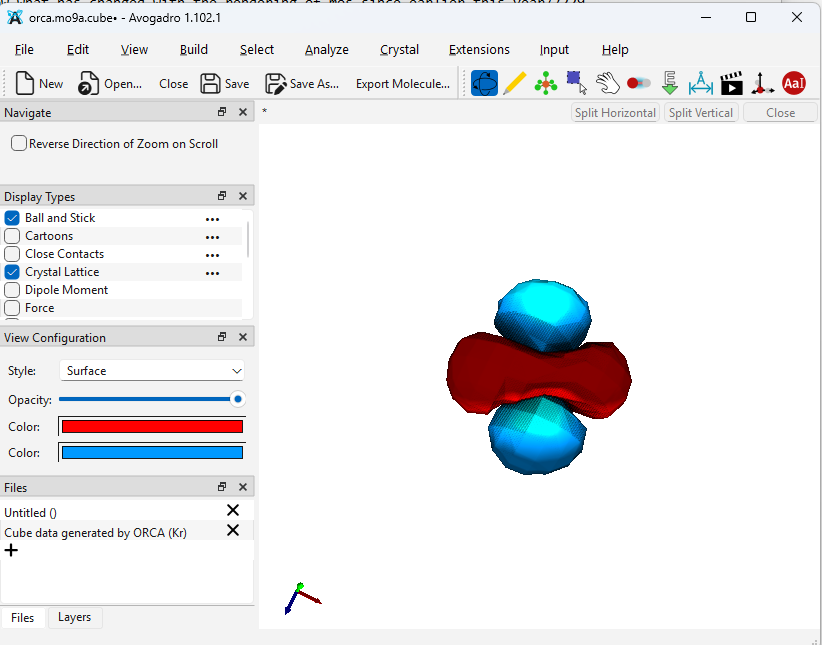
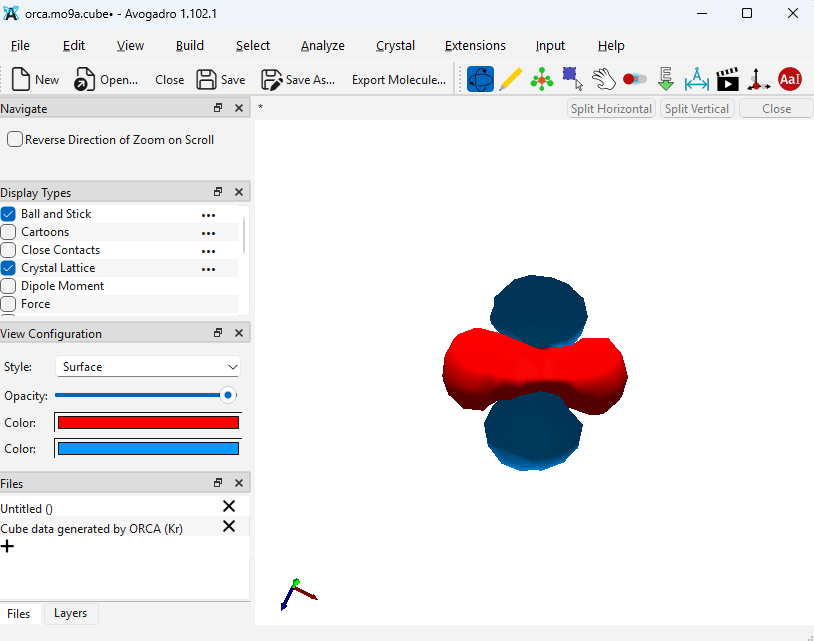
The rendering of that cube file is a bit strange. Still there is this peculiar behavior when I change the Opacitiy from 98 to 100 %.
This is at 100 % (also some artefacts are visible)
This is at 98 %…
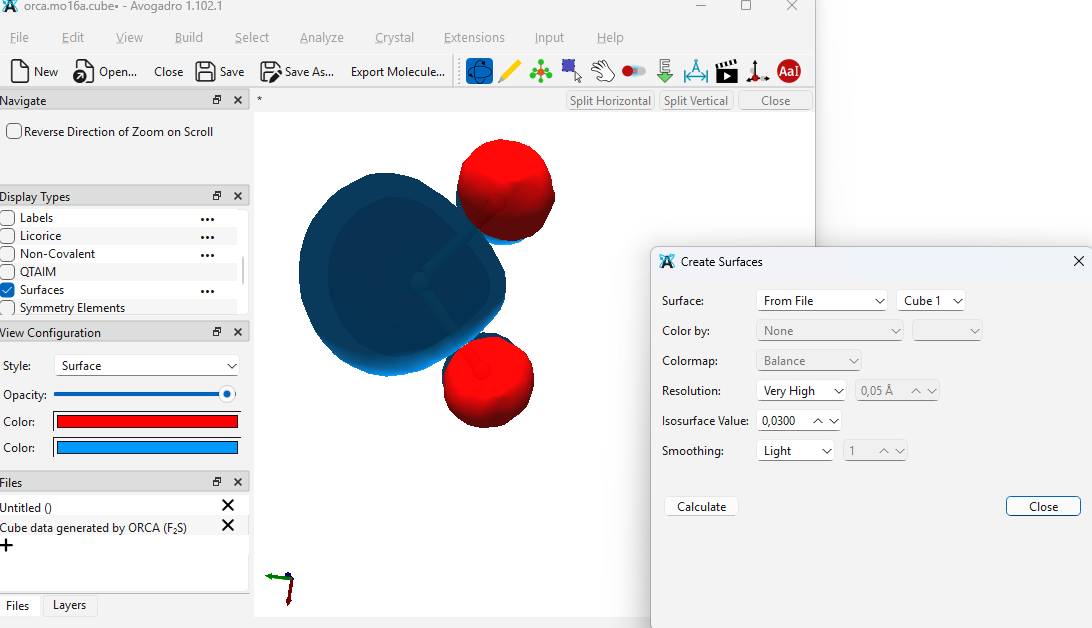
Another issue: In Avo1 it was easy to set the quality of the rendering. Why are these kind options not visible under the ‘View Configuration’ panel? Maybe I am overlooking something, but in Avo2 the way to change the quality and also the isovalue of the isosurface is to go to ‘Analyze’ (why analyze?), then ‘Create surfaces’ (why create?), then by default ‘Van der Waals’ is selected, so you have to change it in this dialogue to ‘From File’ and then you can finally choose other iso values and rendering options. By the way: in my version there is no difference between the quality options, the orbital is looking exactly the same regardless of what option I choose.
I also noticed that the reference axes are not oriented in the way I would expect. In the images above we see simply a dz2 orbital, but the reference axes are not oriented accordning to the alignment of that orbital (?)
Speaking of reference axes: They command to show/hide the reference axes via the ‘View’ menu is not working, the axes are permanently visible.
best wishes
A cube file will only have one “cube” so only one orbital (or whatever you generated.) What you describe from Avo 1 still works - if you have an Orca output file with the MO and basis set printed, the table will appear. Or generate a molden file.
You mentioned a few bugs which have been fixed since 1.102.1 was released (e.g. opacity). Since 1.103 will come out on Friday, I’d suggest grabbing a continuous release: Release continuous · OpenChemistry/avogadrolibs · GitHub
This will also have the various crystal tweaks we discussed last week and the volumetric rendering option for surfaces.
Since you have a cube file, Avogadro can only render it at the resolution of the cube. If you have the output file with basis set data or molden or fchk, etc. it can render arbitrary resolution.
I’d have to see the file. My guess is that the frame of reference is not quite what you expect.
Please grab a continuous release or 1.103.
No, that was my point. I have an output file (which works well in Avo1) but not in Avo2.
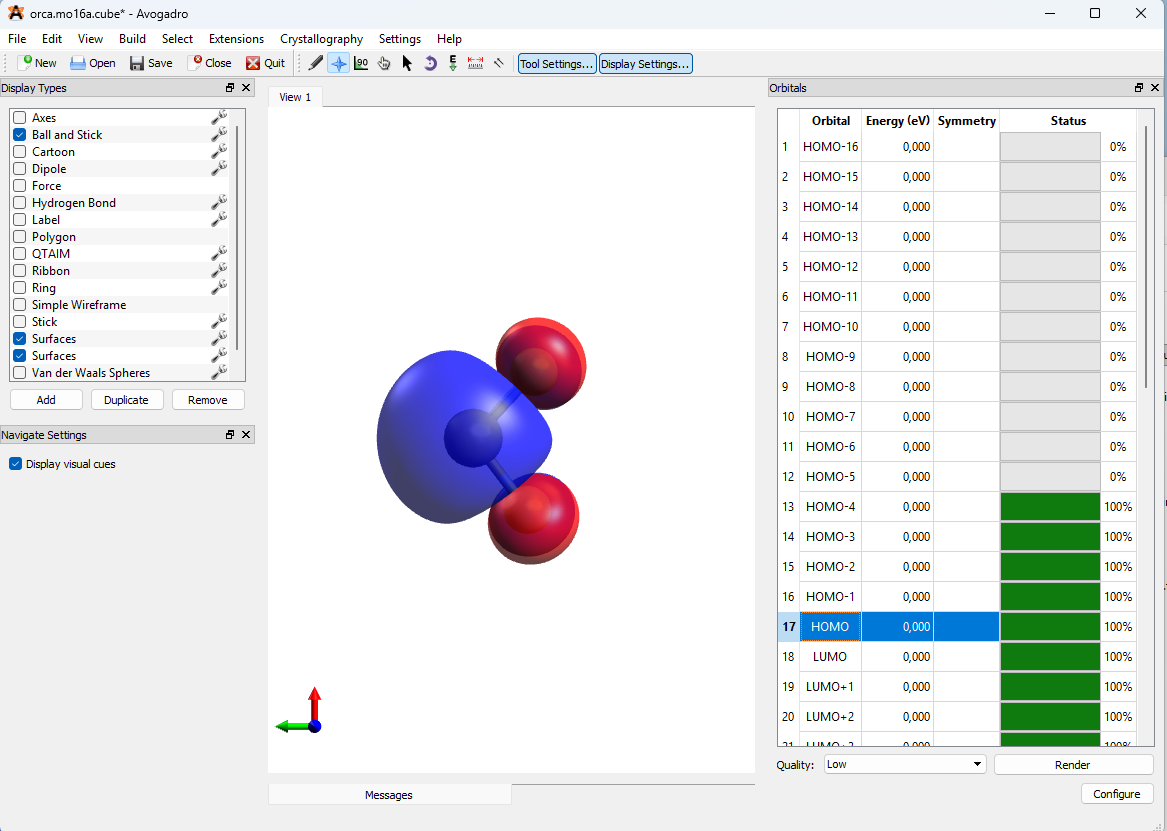
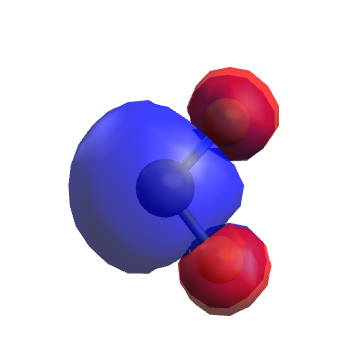
Loading a cube file (a MO of SO2) in Avo1 - the table is generated:
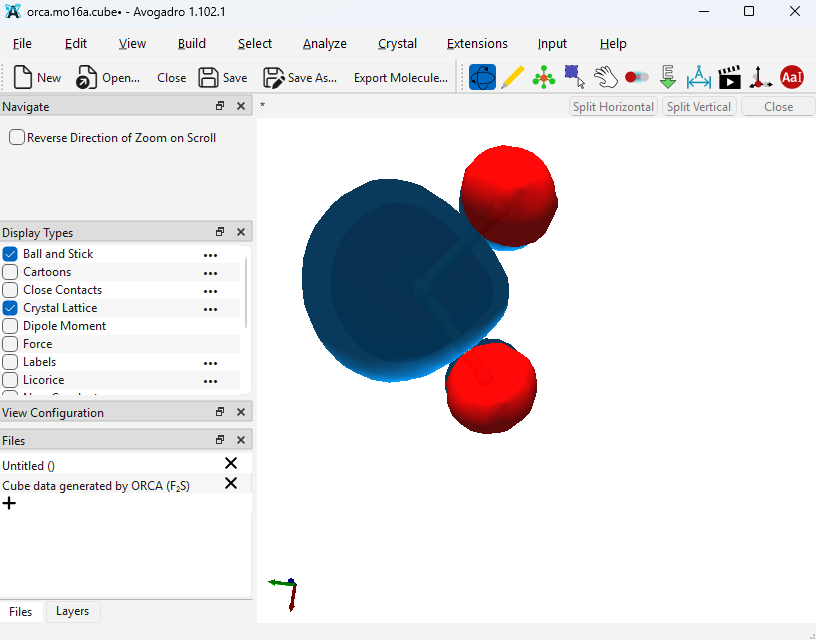
Loading the same cube file (with the same output files available in the same folder) in Avo2:
No table is generated.
But I will try this again in 1.103…
Okey, I thought different interpolation schemes/smootheing algorithms are applied here. And the bahavior is different compared to Avo1. The way Avo1 renders the orbital is shown above (very smooth, I like it). When I switch to low resolution it changes to:
Clearly a difference.
When I apply high resolution in Avo2 to the very same file it still looks like the initial low resolution (see above):
Do you have an opinion about the cumbersome procedure to change fundamental values of the surface via the ‘Analyze - Create Surface…” command?
For today I say Good night from Germany 
Yeah, in Avo1, we’d look for other files in the directory. I don’t think that’s a great idea. If you load a cube file, you’ll get that cube .. maybe it’s a special cube with difference density or transition orbitals.
Load up the output file.
Yes, that’s my point. If you load a cube file, we’re limited to whatever resolution of the cube. If you load the output or molden or fchk, we get the underlying MO functions and basis and can render at whatever resolution you want.
I guess I didn’t consider it very cumbersome to change the isosurface values? What’s so complicated?
Okey, I think we’re talking at cross purposes.
Why is the orbital in Avo1 looking great and in Avo2 poor? I didn’t get this.
Two points: Inconsistency and Wording. The colors and opacity can be adjusted in the ‘View Configuration’ panel, which is already visible. Why can’t I adjust all other properties there, too? When I wanted to adjust the iso value, do I have to ‘Analyze’ something? Why do I have to ‘Create Surface…’? It is already there…
Sorry to say this, but I have the impression that a certain defensive reflex prevails here in the forum. I can certainly stop posting here my thoughts and can switch to IBOViewer. But I thought Avogadro 2 was supposed to be better than Avogadro 1…
(I would have dozens of other issues which aren’t great in the current release, but anyway)
Bye!
I’ve been trying to explain this - I certainly haven’t been defensive. I’m just doing my best to address your question.
Avogadro v1 did a trick. If you loaded any file (e.g., a cube) and it found say a molden file or output file with the basis set, it would use that. But that’s not a great idea. If my student carefully prepares a cube file with some particular thing (e.g., transition orbitals) – they get something else entirely (e.g., the ground-state orbitals)
Avogadro v2 loads the file you load. That’s it. So if you load a cube, you get the resolution of the cube. (Which in your case seems pretty low resolution.) If you load a molden or fchk or output file with basis set information, you can calculate at high resolution. This is the same behavior as many other programs like VMD or Pymol, etc. Display the data that the user supplied. Cube = fixed resolution
We do welcome your issues, comments, etc. In this case, as I’ve been explaining you’re asking for “can I get better resolution from a cube file” and the answer is “if you want higher resolution, you should use the output file or molden file” because we can compute at any resolution.
If you think that’s being defensive, I don’t know what to say.
Because you’re asking for a new surface with a different iso value?
If IBOview or some other program better meets your needs, great. There are plenty of good programs.
If you want to use Avogadro and feedback, we definitely appreciate it.