Part of the redesign for plugins requires some updates to the plugin download window.
Since some plugins will be single-type (e.g., “energy” or “format”) I think it would be helpful to have that kind of metadata for the table. This would also make it easier to search / filter for “charge” or “format” plugins.
Status
Name
Type
Version / Date
Author
Description
X
TurtleMol
command
0.3
Dom Filonowich
Pack unit cells
MACE
energy (calculator?)
1.0 - 2026-04-01
Alice and Bob
ML energy model
X
xtb
combined
0.19 - 2026-03-14
Matt
WESTPA Reader
format
0.1
Lillian Chong
Read WESTPA
Then there would be a search bar to help filter from the hundreds of forthcoming plugins
Status would replace the current checkboxes, with an indicator for installed (checkmark), updates pending, etc. .. potentially even “incompatible” since I can imagine a plugin needing v2.4 of Avogadro but a user is still on 2.1.
The README section would be hidden by default, but also show the author name, version, updated date, and link to the homepage as headers above the text.
And finally an “update all” to grab the latest and greatest updates.
Another thought is to have a tab for the README and another one for version notes.. or some other way to show “what’s new” when a plugin has new releases
Looks very nice to me! Both in terms of layout and visible information.
I would suggest that status is actually “Installation Status”, and maybe the installed version is displayed in brackets next to the checkmark? And that the “Version” column is specifically for the most recent available, and it is that that is highlighted when a new version is available? Just ideas.
How about the final column just contains a Details button, and clicking that opens up a subwindow or switches to the second tab?
Certainly having it hidden by default seems a good idea. I was thinking that ideally all the information that the plugin downloader needs to display the list of plugins should be stored in the index on avogadro.cc. The READMEs of the plugins are cumulatively too large to do that with, so obviously requests to each individual repo are then unavoidable in order to display the README in the plugin downloader window, but if the README was only shown when that tab or dialog or whatever is made visible then the requests could be done one at a time to specific repos and only when necessary.
That could also apply to changelog information, for example – plugins could have the option of having a CHANGELOG.md file next to their TOML metadata file and their README.
The status column would likely be a set of icons. Not entirely sure, but probably something like a check for “installed = all good” and a red stop-sign for “not compatible.” Not sure about the “installed, update pending”
I would prefer to get that from the GitHub releases, but a CHANGELOG.md or CHANGES.md would be a good option too.
Looking around it seems like an up arrow (update available) or down arrow (download) are fairly common. I might also use something like ! to highlight the updates?
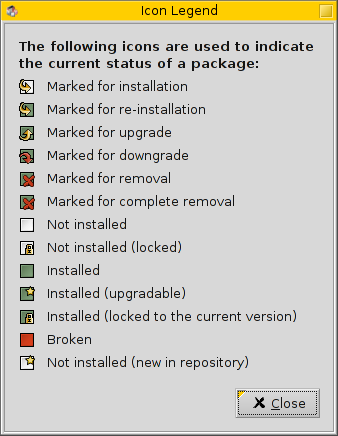
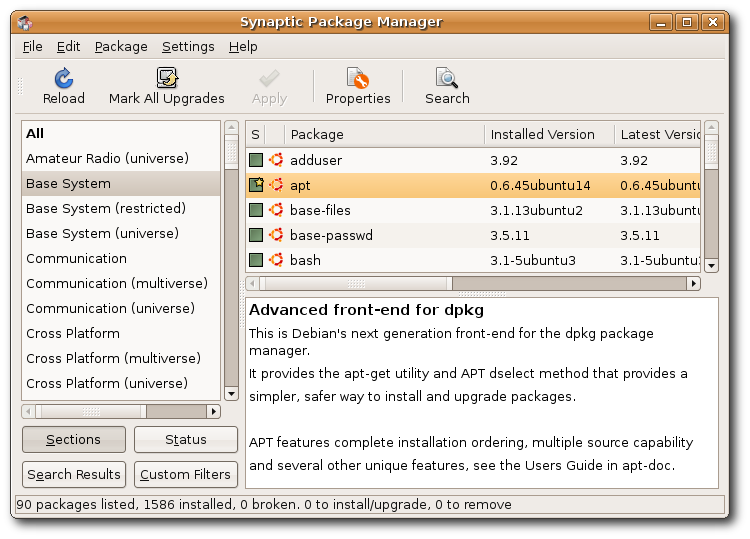
Synaptic, one of the more popular package managers for Linux Debian and Ubuntu indicates packages as installed with a square filled with green color. In case the manager is aware about an update available, an additional star is superimposed. Survey of the palette:
Thanks. We probably won’t have all of those “status” options, but it’s some useful context. Seems like “up” arrow = upgrade is becoming fairly standard.
Removal is a good point too. Currently we don’t have a good way to remove plugins once installed.