Every time I download plugins there comes up an error message “Error while extracting: ERROR - r < ARCHIVE_WARN” while the file is decompressed successfully. I have no idea and don’t know how to solve it.
It would help a lot if you could indicate what OS you’re using, what version of Avogadro, and how the error message appears.
Thanks!
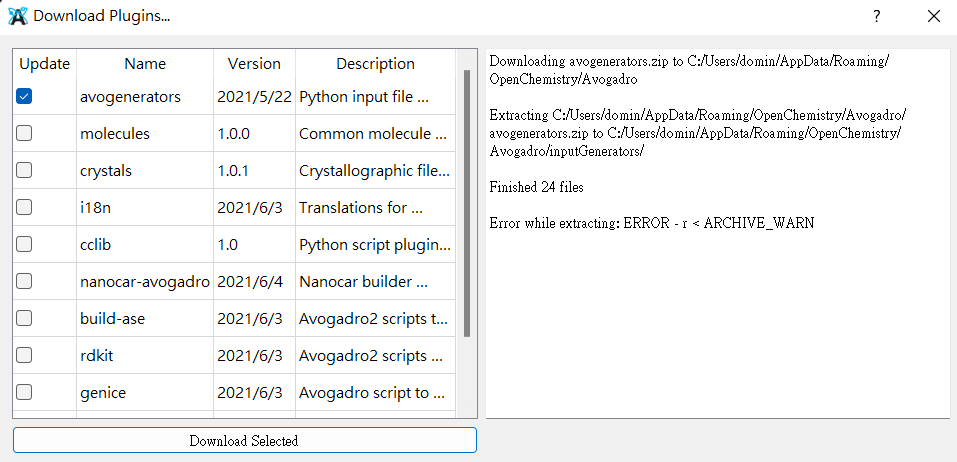
Any update on this?? I am facing the same issue.
I think since it has been a long time from the previous post I’ll ask a few of the standard questions just to get some updated information
- What version of Avogadro are you using?
- What is your OS version?
- Is your error message the exact same or is it different from the original post?
Hi,
I am running Avgadro2 in Windows11. The error message is exactly the same as before.
Since Avogadro2 continues to come out with new releases, the question was “what version of Avogadro2 are you using?” The previous post was with 1.97 and I thought we had fixed that particular bug. The current release is 1.99, although I strongly suggest using a nightly build from https://two.avogadro.cc/
Hi,
I have the exact same issue, Avogadro2 version 1.100 (also tried the nightly build) on Windows 11.
Thanks. I’ll file a GitHub issue to track this. (As it indicates, maybe it’s just a warning, but everything was successful? In which case we need to fix the messaging.)
Does the plugin seem to install correctly?
Also, are you running as admin or normal user on Windows?
Thanks for the fast reply. The installation was not successful, the unpacking of the zip-archive was aborted after the first file, seems like the sub-folders wouldn’t extract? I tried running both in normal mode and in admin mode with the same result.
Hmm. Okay, I’ll see if I can get a build on GitHub with some more messages about the individual steps of the download-and-extract piece to see if we figure out what’s happening.
I can’t make it work either. I installed Avogadro2 20 minutes ago following instructions in the ORCA manual. I want to use Avogadro2 ORCA input generator, but I’m running into the same problem as reported above.
Downloading avogenerators.zip to C:/Users/www/AppData/Local/OpenChemistry/Avogadro
Extracting C:/Users/www/AppData/Local/OpenChemistry/Avogadro/avogenerators.zip to C:/Users/www/AppData/Local/OpenChemistry/Avogadro/inputGenerators/
Finished 24 files
Error while extracting: ERROR - r < ARCHIVE_WARN
Windows 11, Nightly Build, 1.100.0-124-g2695509
ChatGPT advised to download it directly and unpack into the folder. This doesn’t work either. I mean, I can download the archive and unpack it, but Avogadro doesn’t add any new Input option to the menu.
How to fix it
Option A: Manual install (most reliable)
Download the generators directly: avogenerators releases.
Unzip it manually with 7-Zip or Windows Explorer.
Copy the folder
avogenerators-master/inputGeneratorsintoC:\Users\www\AppData\Local\OpenChemistry\Avogadro\inputGenerators(so inside that directory you see subfolders like
orca,gaussian, etc.).Restart Avogadro → Input → ORCA… should now appear.
You don’t need to download anything if you just want the generators. The input generators are included - the ORCA generator needs Python to be available. Avogadro should offer to install it for you.
- Python installer - Python Releases for Windows | Python.org e.g. https://www.python.org/ftp/python/3.13.7/python-3.13.7-amd64.exe
- conda-forge installer - conda-forge | community-driven packaging for conda
I have Anaconda. Avogadro seems to be ignoring it, despite it allows me to choose an Anaconda environment in Python Settings. Does it require any specific packages in the environment?
No, no specific packages are required. Not sure why it would be ignored, but it’s probably better to continue this discussion on a separate thread (e.g. if it’s about using your currently installed Python).
Is Anaconda in your system PATH?