Environment Information
Avogadro version: 1.100
Operating system and version: Windows 11
Expected Behavior
Orca should appear in Input option
Actual Behavior
I can’t see ORCA in Input option as I want to generate ORCA Input files from Avagadro 1.100
If you don’t have Python in your PATH, Avogadro will prompt you to install it. Otherwise, ORCA and many other input generators won’t appear. (They’re really Python scripts.)
Could you please guide me on installing Python and adding it to the path?
Thank you in advance.
There are a few ways to install Python on Windows. As I mentioned, Avogadro should pop up a dialog on first launch if it doesn’t find Python.
I personally recommend: https://github.com/conda-forge/miniforge/releases/latest/download/Miniforge3-Windows-x86_64.exe
You can also install Python through the Microsoft app store, or from the official Python installer (currently 3.13.7)
Each of these should offer the option to add Python to the PATH, although it may not be the default.
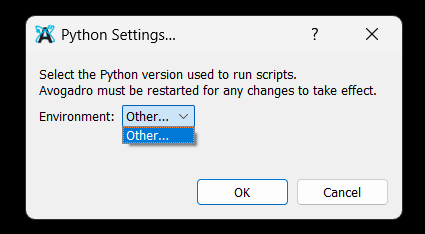
Hi I have installed python. However, can’t see an option to add python.
PFA the screenshot.
Well, choosing “Other…” should bring up a dialog to pick your Python install path. But it would also figure it out if python.exe is in your PATH from the install.
How did you install Python? Did you add it to your system command PATH?