Hi,
I was wondering if there is a way to view you molecule without the hydrogens without actually deleting them from the molecule? I am trying to get a clearer view of my molecule without the hydrogens, but the only option is Build > remove hydrogens which deletes them from the molecule.
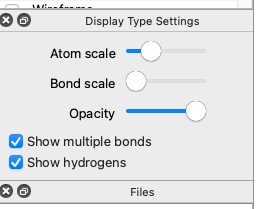
Assuming you’re using Avogadro 2 (e.g., 1.99 or later) you can click on the “Ball and Stick” display type to bring up the options panel:
You can un-check “show hydrogens” to hide them.
There’s a few other ways, but that’s the easiest.
Thank you,
Is it possible to do this using Avogadro 1.2?
Sorry, no. You should upgrade from https://two.Avogadro.cc