Flatpak default permissions

When I took the reigns of maintaining the Flatpak, I did some work to get it in line with the general principles of the format and work like a Flatpak is supposed to. This meant fixing a bunch of things so that it ran correctly and equivalently to the other Linux formats, but it also meant reducing the number of special permissions that Avogadro demanded. The only extra permission that Avogadro now requires by default is network access for plugin downloads, fragment imports etc..

One key consequence of this is that Avogadro, when run as a Flatpak, doesn’t see the vast majority of the user’s files, only a small corner specifically allocated to it (under ~/.var/app). Opening and closing files works completely fine and normally, because that goes via the file dialog and the underlying desktop portal that sees the normal filesystem and then gives Avogadro access to the files selected by the user.

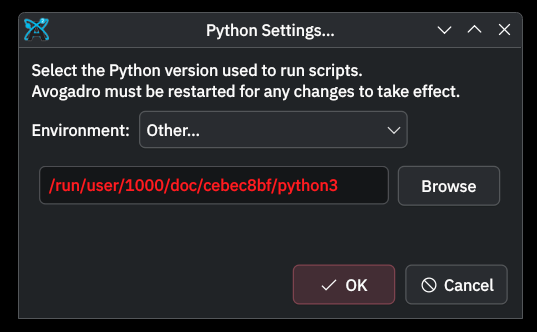
In other contexts, however, paths of files in the user’s files then appear to Avogadro to simply not exist. This has led to a couple of bug reports in the past few days that aren’t really bugs (2166 and 2167). The first is specification of a Python interpreter that is in a location not visible to Avogadro, the second is that drag-and-drop of files into the program’s main window doesn’t work.

For the record, and for any future readers: the user can actually really easily fix this, all they have to do is give the Flatpak permission to access the required parts of the filesystem. On KDE Plasma this can even be done in the system settings; with GNOME/Cinnamon/other DEs it can be done with the very nice Flatseal app (available itself as a Flatpak) or of course via the flatpak CLI. At minimum, I’ll add a note to two.avogadro.cc/install/flatpak to try and help make users aware.

The question I have is whether we should simply change the default permissions that Avogadro requests to include (ideally read-only) access to the user’s home directory.

This would have the advantage that these few things would then work out-of-the-box. It’s just a bit less in the spirit of Flatpak have that broader access by default.

Either way, the user still has control. If we keep it as is, any user can give Avogadro extra permissions at any time; if we request home access by default, a user who cares is still able to unilaterally disable that access at any time via the same mechanism.

Apps should definitely be conservative in their permission demands, but the mechanism to request them exists because some apps need them to function. I’d like to know if we think that a smooth user experience that doesn’t require troubleshooting for common Avogadro workflows outweighs the arguments for strong sandboxing by default? I assume the answer is yes, but opinions welcome…

What do we think?
Just as a note re drag-and-drop, primarily for @ghutchis:

Drag-and-drop should actually work seamlessly for Flatpaks just like file dialogs do – there’s an XDG desktop portal that specifically enables it (the FileTransfer portal). I think it requires handling the received data in a specific way (that includes interpretation of the MIME type) but I don’t think that’s necessarily why it doesn’t work for Avogadro, as it seems Qt hasn’t implemented the respective desktop portal yet.

KDE has been handling it by implementing the desktop portal themselves for now in KCoreAddons, so we could alternatively make us of that in order to handle it.

Interestingly, the KCoreAddons repo lists autosave as one of the functionalities it provides. It’s a cross-platform library built on top of QtCore. So maybe there would be a couple of good reasons to look at adding it as a dependency…

Point being really that it’s the drag-and-drop that bothers me, and so even if we expanded the Flatpak permissions for now, maybe there’s another way round it or it’ll be implemented in Qt and at some point we won’t need it for DnD and we can go back to the restricted access.

Yes, I think this is probably a good idea. I had to slightly expand the Mac entitlements because Qt6 uses a different regex library that includes a JIT compiler.

It’s always important to have good sandboxing - but we want common workflows to “just work.”

As far as the KCoreAddons - the autosave has mostly been left as a “good first issue” since it wouldn’t take me long to add it. I’m somewhat surprised by the file transfer issue, but we can look into that as well if it doesn’t get added to Qt 6.x at some point.

1 Like

Actually, it turns out that having access to home doesn’t seem to help the Python issue. Flatpak users are better off just using the Python that’s “within” the Flatpak, which works fine, rather than trying to reuse another virtual environment.

(This is a very small loss imo, especially given the changes we are looking to make to the Python workings.)

As such I’m no longer inclined to seek the permissions exception (which has to be applied for and approved) just for the drag-and-drop functionality, which has an easy workaround, should be improved by Qt at some point anyway, and has other solutions (KCoreAddons) available if not.

Instead I’ll add some info on the known constraints to the Flatpak page on the website, along with workarounds.

Is there a good way to detect that (i.e., so Avogadro doesn’t display un-usable environments)?

Hmm, well, selecting a venv at /home/matt/python/example/.venv/bin/python3 in the file picker manifests as:

so if the path received by Avogadro is under /run/user we could assume that the user’s using the Flatpak and provide an appropriate error message I guess.

Problem with that is, I don’t know how much that would really help?

Because although we could inform the user why there’s an issue, we couldn’t give them a hint as to a solution, as it’s currently basically impossible to create a virtual environment useable by Avogadro in the sandbox, the “global” environment within the Flatpak is read-only, and even if it wasn’t then the Python distribution included in the KDE Flatpak runtime doesn’t include pip so Avogadro can’t install packages anyway.

Well, I’m assuming that using the Flatpak:

  • input generators work because they just need a generic python
  • installing plugins are hit-or-miss because they usually need to install packages

So I suggest two parts:

  • In the Python settings, disable some parts of the dialog and add a warning message about “Using a Flatpak, Avogadro cannot install Python packages”
  • Add something similar to the download code (i.e., some packages might be okay, but most will fail)

The downloader probably needs a bunch of new logic anyways. For example, if you’re using a system Python on Linux, you probably need pip install --user since you can’t modify the system packages, etc.

Correct, though my impression is that actually very few of the plugins in the repository actually have dependencies.

This would be relatively easily fixable though, actually. It would require only two things:

  1. Us to vendor some package manager and bundle it with Avogadro (can be Pixi eventually, for now it would be very straightforward just to add pip)
  2. This:

Yet. Many of the scripts I need to polish up and publish do, e.g. partial charge models, ML potentials, etc.

I think we should just do that. I was already working to package pixi with the next release on Mac and Windows. There’s a bit of logic needed (e.g., running scripts, installing plugins, etc.)

That’s why I noticed that the current downloader code needs some work anyway (e.g. pip install --user) including recognizing pyproject.toml files.

  • If pixi is installed, use that (and look for pyproject.toml or requirements.txt)
  • If pip is installed, use that (same)
1 Like

In fact, it seems like the Flatpak already has access to KDE Frameworks as they are included in the KDE runtime. So if we used it it would be in the form of a dynamic link to a system library that would not increase the install size.

I’ll have a look at making use of it at some point, probably by putting it behind a build flag like --USE_KDF so that it can be selectively built for the Flatpak only, what do you think?

1 Like