First off, a huge congrats on the launch of v2.0.0! The improvements are tremendous, and it’s clear how much work has gone into making Avogadro an indispensable tool for the community.
We’ve just set up Avogadro2 v2.0.0 on our HPC system using Open OnDemand. It’s being used by our researchers and also for our undergraduate quantum chemistry and molecular modeling classes. While getting everything running, I’ve run into a few things that I’m not sure are bugs or intended behaviors, so I wanted to start a discussion.
On the UX side:
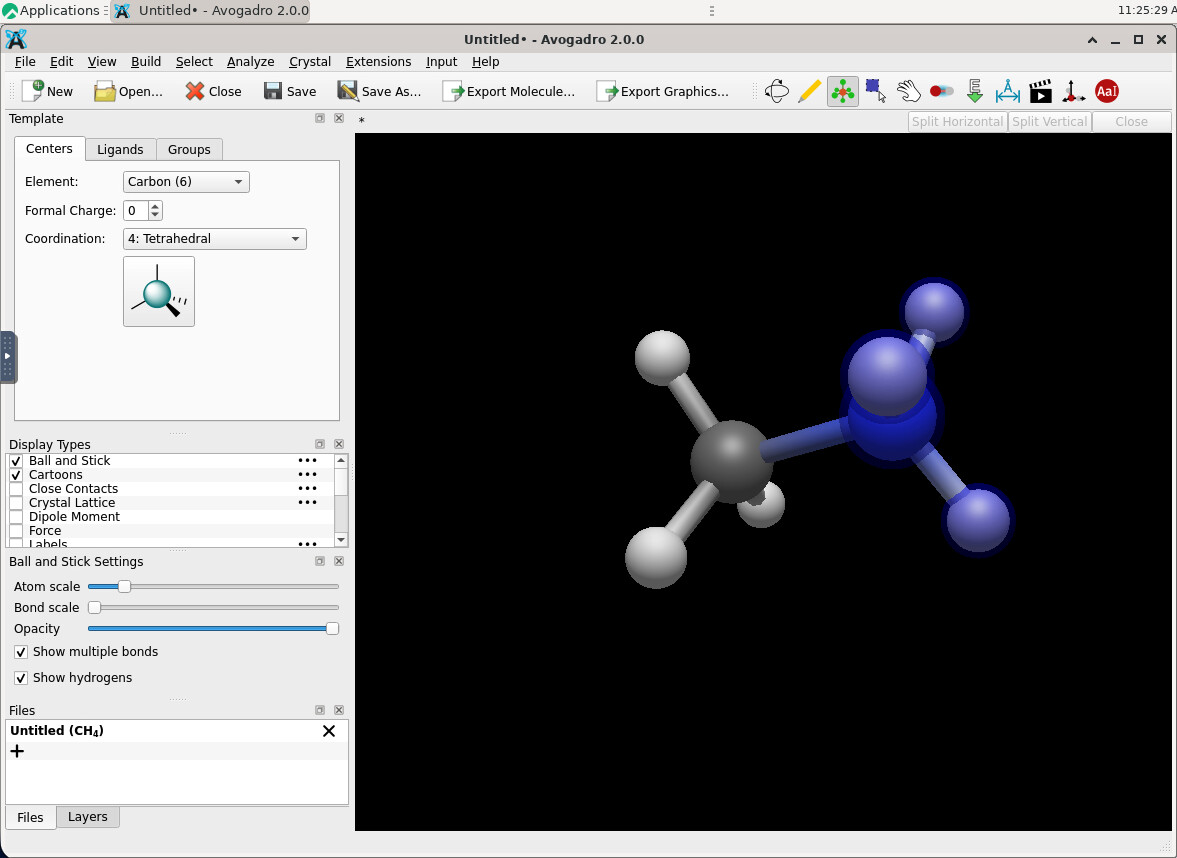
Template Mode: I’ve wanted this feature since Avogadro 1! However, I noticed the atoms don’t always follow the panel selection. For instance, I tried adding a tetrahedral carbon to methane, but it added a nitrogen instead (see attached photo).
Atom Types: It feels a bit clunky that we have to switch to draw mode just to change an atom type. Is there a way to streamline this?
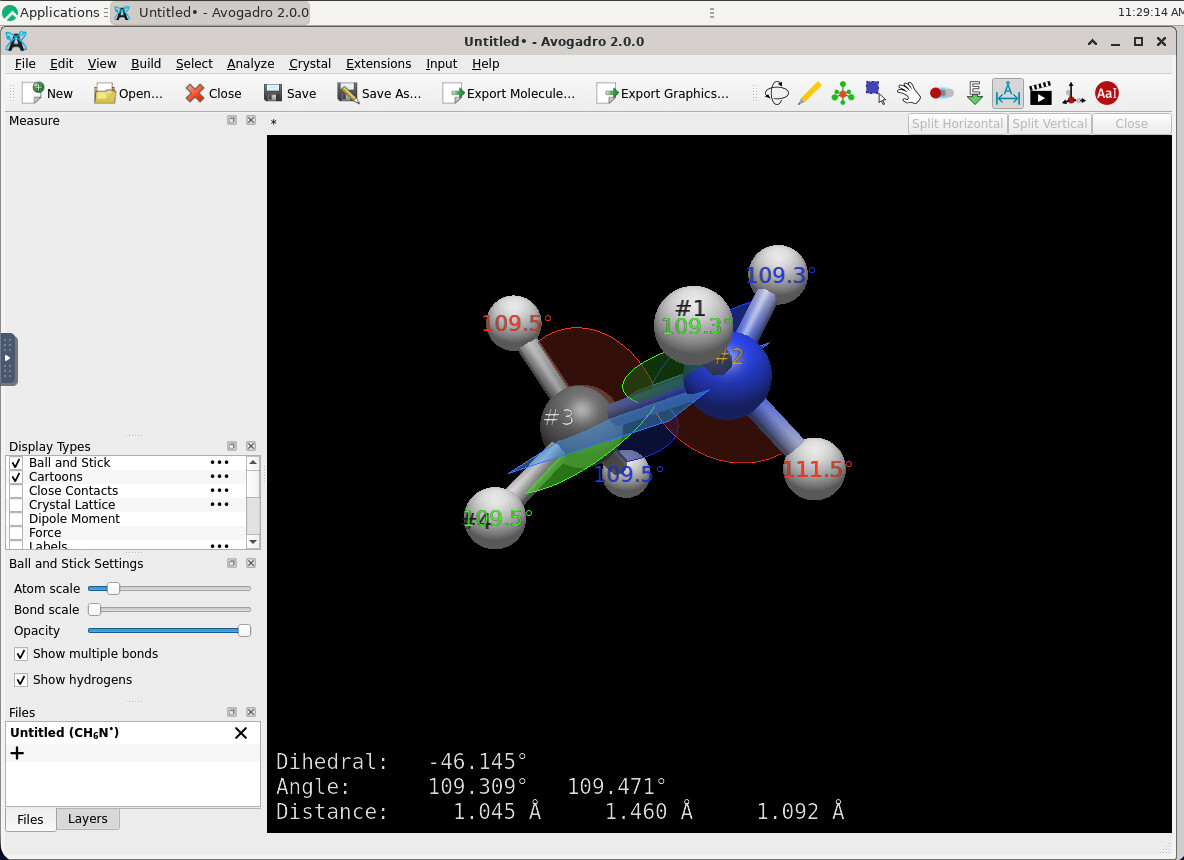
Dihedral Angles: Dragging atoms to set dihedrals is a bit of a struggle once the molecules get larger. Would it be possible to add a feature to type in the angle value directly?
Atom Labels: Sometimes labels stay on screen after I’ve deselected the atom. I suspect this might be due to VNC lag, but I thought it was worth mentioning.
On the technical/deployment side:
Plugin Installation: We had a smooth time setting up the OOD portal, except for a couple of quirks. The AppImage didn’t play nice on Rocky 9, so we ended up installing it under a Conda environment. Also, we noticed that pixi struggles to resolve dependencies when running on an interactive node via VNC, even though there is outbound network access. Strangely, if we just SSH into the node and run pixi install manually in the plugin directory, it works perfectly. As a “dirty fix” for now, we’ve written a wrapper called ipix that executes the pixi command via ssh localhost.
Preinstalled Plugins: We tried to provide a full set of preinstalled plugins to our users, but Avogadro seems to ignore the central installation and tries to download a new set regardless.
MoleQueue/Rocky 9: I noticed Avogadro still relies on MoleQueue for scheduler interaction (SLURM). Unfortunately, this package seems outdated and isn’t working correctly on our Rocky 9 system (we can’t add new queues). Is there a plan to move away from MoleQueue in a future release?
Glad to know you have it working on Open OnDemand. Would you be willing to write up a short guide - I’m sure other HPC centers would be happy to know more.
Sure, because the tool is not designed for “click the hydrogen to create and bond a new center.” So whatever ligand (probably \ce{NH3}) is added.
It’s intended for “click a spot in free space” to create a center, then add ligands or functional groups off of hydrogen atoms. It would take a some work to add centers with a pre-specified geometry and built off a hydrogen position. I understand you wanting to use it that way, but there’s definitely no code to do what you’re trying to do.
Certainly “adding a ligand when the Centers tab is active” is a bug. I’ll think about how much work it’ll take to handle adding a center like that.
As I do in the tutorials and tutorial video, you can use Control-2 and Control-3 to switch between the tools.
The template tool is not intended to do everything. Handling “click an existing element to change the element” would be tricky from a UX perspective. What if the previous element was a different geometry. Should it replace the element and the geometry? What if some ligands are already placed?
You already can. Go to Analyze => Properties => Torsion .. select the one you want and edit the number.
I’m open to suggestions about central deployment of plugins. Right now, because we need to ensure the pixi or venv environment is installed correctly and the user has the plugin “registered” in their settings for caching, we prioritized the single-user experience for 2.0.
If you’ve got an alternative, I’d be curious to know more. My intent was to update MoleQueue over the summer, because I’m not aware of an easy-to-use GUI for interacting with local and cluster jobs.
I would be happy to do that, but it may take me some time to prepare.
It is a pity to hear that, as we have become accustomed to editing molecules using templates in Spartan. I find this approach more intuitive, and the results tend to be more predictable based on users’ understanding of VSEPR theory.
I understand. However, it would be even more intuitive if users could edit the values directly in the measurement panel. Currently, as you can see in the following picture, the left “Measure” panel is empty and could be a suitable place to implement such an editing feature
I agree that the single-user experience should have higher priority. However, I also see strong potential for Avogadro2 to be used in chemistry education within an HPC environment, as a free alternative to GaussianView, Spartan, or WebMO.
As to the template tool / centers.. of course once you release code out into the world, people use it in different ways that you expect. It’s certainly possible to “click to insert” a center with a specific geometry - it’s just that the code doesn’t yet exist and would take some adapting. I can probably figure out some ways to get it done by 2.1.
Interesting idea. Seems like that could work.
For sure. There are plenty of such users and not just in chemistry education. As I said, I’m open to suggestions, e.g. where a “central directory” for plugins should be. If you look through the forum, you can see that we had some discussion about bundling the generators, etc. Also, I think it would be important that users see some sort of message about registering plugins on launch. Otherwise, I can imagine security issues in which plugin code is installed and run without the user being aware.
I’ll write up a bit about the JSON-RPC protocol used between Avogadro and MoleQueue. I don’t think it would be difficult to adapt to other systems. I’ve also talked a bit with WebMO about submitting jobs and accessing results using Avogadro plugins. I’ll be working on that this summer.
Can Pixi work with a folder that already contains an environment but is read-only? Would it be possible to install a plugin to /opt or /usr/share and have it usable by all users?
What we have tried 1) using symbloic links to bridge the local plugins directory with the shared directory, 2) coped the prebuilt plugins to the user’s plugins directory and change the ownership to $USER, but none of these methods work …
I am also new to the Pixi package manager, so please correct me if I am wrong: my understanding is that when Avogadro2 starts, it checks the plugin directory ($HOME/.local/share/OpenChemistry/Avogadro/plugin;). If the pixi.lock file and the .pixi directory contain references to the original installation path and the user who performed the installation, then these prebuilt plugins (installed by root or the HPC administrator) will not be recognized properly under a different user environment.
As a result, Avogadro does not treat the shared plugins as valid installations and attempts to download and install them again. This reinstallation then fails due to permission restrictions on the shared plugin directory.
In draw mode, undefined bond lengths often lead to unrealistic initial structures, and a simple molecular mechanics (MM) optimization does not reliably produce the expected geometry without considerable manual fine-tuning.
In my experience, Spartan’s approach to molecule creation and editing — using atomic templates with well-defined bonding coordinates — is far superior to the typical draw-and-optimize workflow. However, implementing this type of functionality likely requires substantially more development effort, and to my knowledge, no open-source software currently offers comparable capabilities.
Sounds about right to me, from my own understanding.
I wonder if maybe it’s because Pixi reuses dependencies and uses symlinks and stuff.
Do the users have network access? As in, could they in theory install the plugins themselves, and it’s just that you want to make it easier for them by having it done in advance, or do they have restricted permissions that mean that Pixi couldn’t install anything?
The plugin directory depends on the underlying OS. Avogadro can search multiple locations, so it would be possible, for example to have {prefix}/share/OpenChemistry/Avogadro/plugin as a “shared path.”
As I said, we spent the 2.0 release concentrating on individual users - shouldn’t be hard to come up with options for a shared path. As I said, the main thing is that users will still need to see a “New Plugins Available” dialog with a list of the shared plugins to register in their personal settings file.
You should definitely try the new draw tool. If you change bond orders or change the element of an atom, the bond lengths will definitely adjust.
But I’m very curious to understand why the MM “does not reliably produce the expected geometry?” That sounds like a separate thread.
I was looking through this - it should already be checking /usr/share and /usr/local/share on launch. But it wants to make sure the directories are writable.
I’ll tweak this, so an admin can set up shared plugins.