The shape of the orbitals is visible in the image produced by the “Export Graphics” functionality but they are not properly colored.
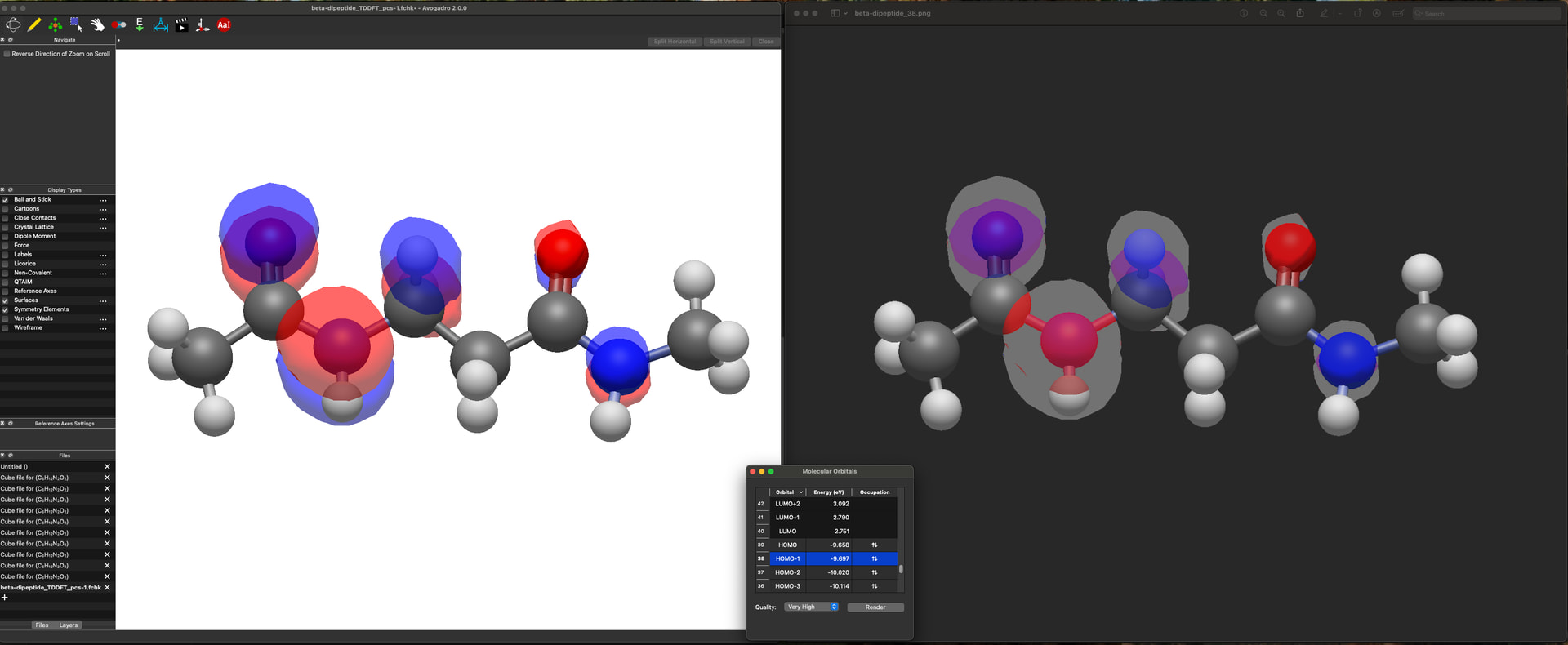
Could ti be a bug or a problem from my end?
No, the export graphics generally tries to set the background to transparent, but there’s a general problem with translucent orbitals.
The easiest workaround at the moment is through a screenshot, which isn’t great, but exporting a transparent background seems to be a big challenge cross-platform.
I have thought about this before and I have wondered if, rather than having image export remove the background, it would be an idea to instead have it include the current/normal background, but introduce the ability to make the background colour itself transparent? Either via a checkbox or an alpha channel?
That’s exactly what it does. It increases the alpha channel of the background color to 100% to make it transparent. But it seems to have unintended consequences, particularly in terms of the color blending with other transparent / translucent pieces like orbitals.
There may be a workaround - OpenGL shaders are hardly my expertise. But to be honest, we’ve run into a variety of issues on different platforms / drivers, which makes me believe transparent background colors are not supported well. (I found that despite line widths being a feature in OpenGL, the 4.0 core profile migration meant that drivers completely ignored it.)
No, my suggestion is that that’s exactly what shouldn’t be done – the exported image should include the background as it is shown in the editor, with the same colour.
The export definitely works for Linux (at least on Fedora), that’s how I made all of the images I took for the user guide. I think this might be, as you suggest, a cross-platform issue. I’d be curious what OS @Juanes is using.
I think this isn’t a bad idea, but I would very much want the behavior to be saved so I don’t have to hit the checkbox every single time.
I’m using MacOS (Sequoia 15.6.1)
Yes, there’s definitely something off with the current Mac settings / rendering mode. I’ve been investigating.
Having a transparent background is important. It’s very nice to copy graphics to slides, etc. without a background (vs. most image tools don’t get it quite right)
Agreed, I very much appreciate Avogadro having graphics without background.
I think I have a good fix. It seems like using black with full transparency is exporting the correct graphics. Give me a few minutes to push changes to both avogadroapp and avogadrolibs.
Works great, thank you!