Hello,
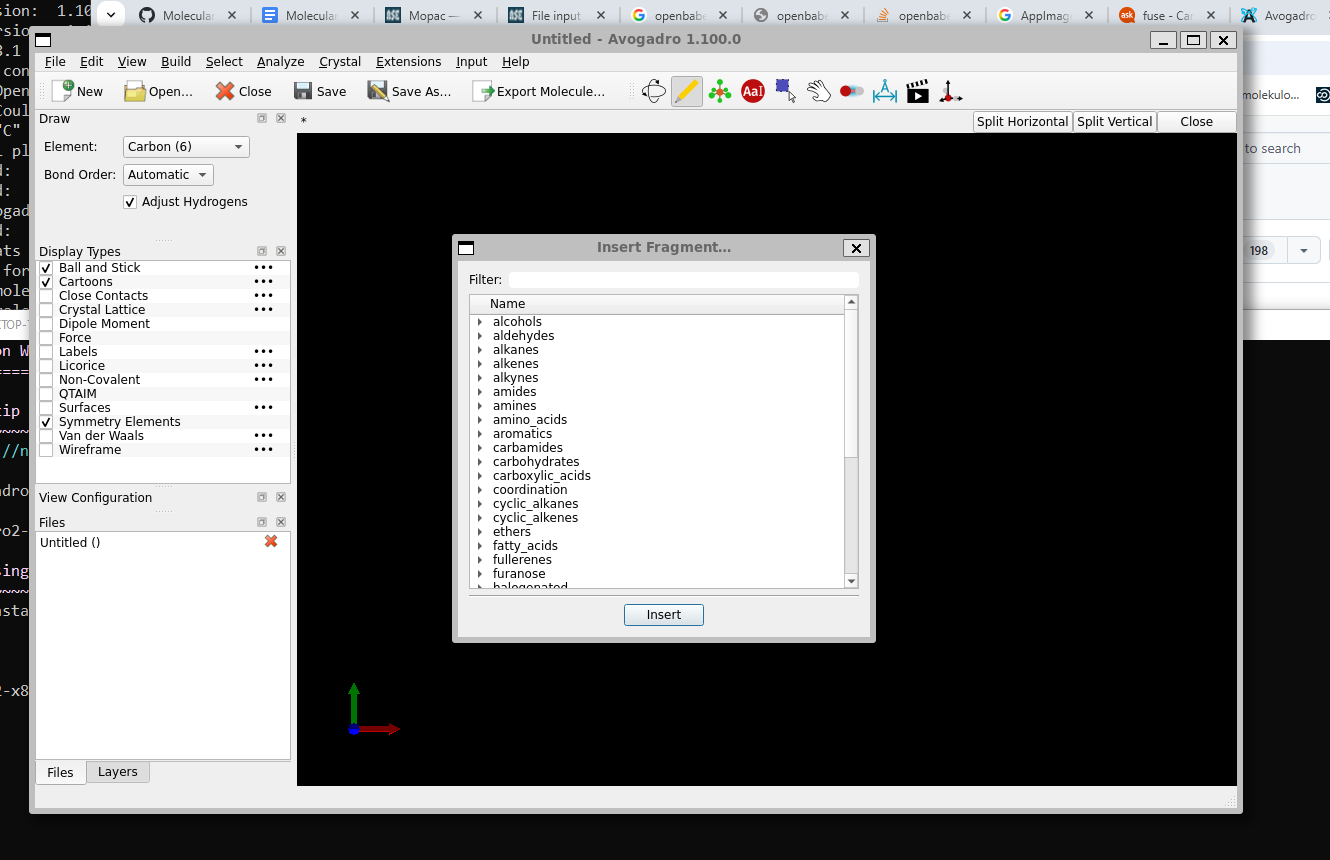
with Avogadro2 (both the 1.95 Ubuntu package and the fresh image) inserting of fragments does not work. Program gets frozen and I have to restart it.
Any help please ?
Hello,
with Avogadro2 (both the 1.95 Ubuntu package and the fresh image) inserting of fragments does not work. Program gets frozen and I have to restart it.
Any help please ?
I’m guessing you mean the 1.100 release package and the nightly AppImage? (You said 1.95 in your post, which is really old, but the screenshot shows 1.100.)
To be clear, you’re saying it freezes when it opens the window and not when you’re inserting the molecule?
I can’t reproduce the freeze. Does it happen on a Windows nightly build (e.g., just limited to WSL)?
Hello,
picture is for nightly AppImage (1.100), the same freezing happens also for 1.95 version of Linux package.
When the insertion window opens, it is already frozen - on WSL under Windows 10/11.
Pure Windows installation works fine for inserting molecules.
I don’t know, but I’m not sure it’s a bug in Avogadro itself because I can’t reproduce it on Ubuntu, Mac, and you said the pure Windows version works too.
When the window opens, it grabs the list of directories (categories) and files. In principle, that’s a model of your filesystem, albeit limited to one directory. It’s possible there’s some bug between Qt and WSL (e.g. Loading...)
I’d recommend getting a package of 1.100 (e.g. from Ubuntu, which I’m guessing is what you’re using for WSL) which uses Qt6. Or maybe the Flatpak from @matterhorn103 which has newer versions of the various dependencies.
I can probably find something to help, but it seems as if there are some known performance issues with Qt programs under WSL (vs. Linux or Windows)
To be honest I’m surprised that Avogadro even runs under WSL.
Can I ask what the advantage of it is for you vs just using the Windows version?
But yes, the Flatpak may well work better given its better encapsulation.
Hello,
Avogadro under WSL (that is Linux under Windows) can run xtb and CREST extensions, what is very valuable for us.
As workaround I would use Avogadro-under-Windows for the Fragments builds, and then turn for Avogadro-under-WSL for important xtb/CREST calculations.
Where to get the Flatpak please ?
Fair enough! It’s really a shame that CREST still doesn’t have a Windows build. The xtb parts of the plugin work fine on Windows though, just in case you didn’t know. It’s only the CREST stuff (conformers, (de)protonation, tautomers) that doesn’t.
The installation guide for the Flatpak is here. I don’t know whether Flatpaks run on Ubuntu under WSL, but they definitely work with Fedora.
I don’t use WSL obviously, but wouldn’t it be possible for the Windows version to call CREST under WSL?
Otherwise, I’d suggest finding some folks to work on this (i.e., getting a conda build of CREST on Windows) Possible to add win-64 package? · Issue #16 · conda-forge/crest-feedstock · GitHub
It’s been a while, but someone would need to tweak the feedstock (e.g., grabbing parts from the xtb recipe to add to the crest-feedstock one) and testing locally. Since I don’t have a Windows machine, I can’t help much.
Once I was fighting similar frozen gui problem with ase-under-wsl:
Maybe something similar is inside Avogadro2.
I am thinking of making full Avogadro2 buildup from a fresh clone under WSL to track this issue…
PS: WSL is hot topic for us, most students/people have Windows PC, it is easy to install WSL there (Install WSL | Microsoft Learn) and profit from all the compchem packages…
@Miroslav_Ilias Did you get a chance to try the Flatpak under WSL?
Hello,
so, my experience with flatpak under WSL:
miroi@MIRO:~/work/software/avogadro2/cloned/.sudo flatpak remote-add --if-not-exists flathub-beta https://flathub.org/beta-repo/flathub-beta.flatpakrepo

miroi@MIRO:~/work/software/avogadro2/cloned/.sudo flatpak install org.openchemistry.Avogadro2//beta
Looking for matches…
error: The application org.openchemistry.Avogadro2/x86_64/beta requires the runtime org.kde.Platform/x86_64/6.8 which was not found
miroi@MIRO:~/work/software/avogadro2/cloned/.

miroi@MIRO:~/work/software/avogadro2/cloned/.sudo flatpak install org.openchemistry.Avogadro2
Looking for matches…
error: The application org.openchemistry.Avogadro2/x86_64/beta requires the runtime org.kde.Platform/x86_64/6.8 which was not found
I find it odd that it doesn’t offer to install the missing dependencies, unlike usual. The solution though is just to first run org.kde.Platform/x86_64/6.8
Fine with flatpak installation, but it does not run Python scripts, although Python is specified and accessible:
miroi@MIRO:~/work/software/avogadro2/.flatpak run org.openchemistry.Avogadro2
Avogadroapp version:  1.100.0
Avogadrolibs version:  1.100.0
Qt version:  6.8.3
qt.core.qobject.connect: QObject::connect(QObject, Unknown): invalid nullptr parameter
SSL version:  "OpenSSL 3.3.3 11 Feb 2025"
Using locale:  "C"
 registering obmm plugins
"/app/bin/obabel"  found:  "/app/bin/obabel: Open Babel 3.1.1 -- Nov 11 2011 -- 11:11:11"
"Cannot load script /home/miroi/.var/app/org.openchemistry.Avogadro2/data/OpenChemistry/Avogadro/commands/avogadro-build-ase/mx2.py"
"Cannot load script /home/miroi/.var/app/org.openchemistry.Avogadro2/data/OpenChemistry/Avogadro/commands/avogadro-build-ase/ribbon.py"
"Cannot load script /home/miroi/.var/app/org.openchemistry.Avogadro2/data/OpenChemistry/Avogadro/commands/TurtleMol/TurtleMol/avogadroPlugin/fillBox.py"
"Cannot load script /home/miroi/.var/app/org.openchemistry.Avogadro2/data/OpenChemistry/Avogadro/commands/TurtleMol/TurtleMol/avogadroPlugin/fillSphere.py"
"Cannot load script /home/miroi/.var/app/org.openchemistry.Avogadro2/data/OpenChemistry/Avogadro/commands/TurtleMol/TurtleMol/avogadroPlugin/fillMesh.py"
"Cannot load script /home/miroi/.var/app/org.openchemistry.Avogadro2/data/OpenChemistry/Avogadro/commands/TurtleMol/TurtleMol/avogadroPlugin/densityBox.py"
"Cannot load script /home/miroi/.var/app/org.openchemistry.Avogadro2/data/OpenChemistry/Avogadro/commands/TurtleMol/TurtleMol/avogadroPlugin/densitySphere.py"
"Cannot load script /home/miroi/.var/app/org.openchemistry.Avogadro2/data/OpenChemistry/Avogadro/commands/TurtleMol/TurtleMol/avogadroPlugin/densityMesh.py"
"Cannot load script /home/miroi/.var/app/org.openchemistry.Avogadro2/data/OpenChemistry/Avogadro/commands/TurtleMol/TurtleMol/avogadroPlugin/definiteBox.py"
"Cannot load script /home/miroi/.var/app/org.openchemistry.Avogadro2/data/OpenChemistry/Avogadro/commands/TurtleMol/TurtleMol/avogadroPlugin/definiteSphere.py"
"Cannot load script /home/miroi/.var/app/org.openchemistry.Avogadro2/data/OpenChemistry/Avogadro/commands/TurtleMol/TurtleMol/avogadroPlugin/definiteMesh.py"
Open Babel formats ready:  144
Setting default format to cjson.
For flatpack Avogadro molecule builder is working, it is not frozen.
I found that after running CREST, I can not analyze conformer properties.. Avogadro2 is not showing that option. The same with openbabel conformer analysis…I do not see the files…
Please help.
There was a bug reported a week or two ago. It’s fixed in HEAD but I don’t think the Flatpak has been building.
If this helps, this is what log says with frozen subwindow:
qt.core.qobject.connect: QObject::connect: No such slot Avogadro::QtGui::InterfaceWidget::updatePreviewText()
qt.core.qobject.connect: QObject::connect: No such slot Avogadro::QtGui::InterfaceWidget::updatePreviewText()
"Unhandled widget in collectOptions for option 'help'."
Checking for  "molecules"  data in "/home/miroi/.local/share/OpenChemistry/Avogadro/data"
Checking for  "molecules"  data in "/home/miroi/.local/share/flatpak/exports/share/OpenChemistry/Avogadro/data"
Checking for  "molecules"  data in "/var/lib/flatpak/exports/share/OpenChemistry/Avogadro/data"
Checking for  "molecules"  data in "/usr/local/share/OpenChemistry/Avogadro/data"
Checking for  "molecules"  data in "/usr/share/OpenChemistry/Avogadro/data"
Checking for  "molecules"  data in "/var/lib/snapd/desktop/OpenChemistry/Avogadro/data"
Checking for  "molecules"  data in "/tmp/.mount_AvogadYYYEdm/usr/bin/../share/avogadro2"