Hello, I recently downloaded Avogadro 2, and I am having difficulty generating orca input files. I followed the advice provided in these previous threads to the best of my ability:
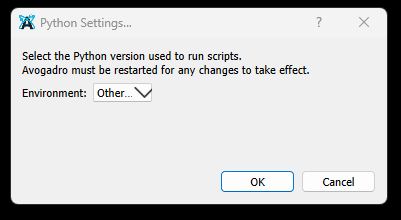
I am using a nightly version and downloaded miniforge as instructed but my Avogadro 2 won’t let me set the Python version. When I choose Extensions>Python Settings, I get this menu with no option besides “other…”
This happens before and after I download the input plugins. When I installed miniforge, I think I set it to be in the path so it would be visible to programs like this. Any advice would be helpful.
Environment Information
Avogadro version: 1.100.0-7-gac3f38f
Operating system and version: Windows 11
Is there any news on this?
I have Avogadro 2 installed on a separate drive (I, if that matters, on I:\AvogadroII\Avogadro2) and Miniforge3 on the C-drive (default location, C:\ProgramData\miniforge3).
As I write this, I checked one last thing, reinstalled just for my “main” user, into the folder C:\Users\Paul\miniforge3) AND had it add to the PATH, which the installation GUI of Miniforge3 strongly discourages, and then I was finally able to find it in Avogadro2.
Now, maybe this is obvious to other (computational) chemists, but if you’re stuck with this error like I was, maybe this helps?
Since I don’t use Windows, I haven’t had much time to sort this out - I’ve been working more on the optimization constraints and auto-optimize tool right now.
On the other hand, I do want to fix this (and make it easier to install python for new users) before the 1.101 release.
Clearly, the current release isn’t finding it outside of PATH on Windows.
If you are constantly nagged by the ‘Download Python’ prompt every time you open Avogadro 2 (v1.9x/1.103), and the Environment dropdown in Python Settings only shows ‘Other…’ with no selectable options, stop trying to fix it through the menu. You can bypass this by ‘injecting’ the Python environment via a modified shortcut. Right-click your Avogadro 2 shortcut → Properties, and in the Target field, replace the entire path with this command:
(Note: Update the paths if your Miniforge or Avogadro are installed elsewhere). This force-activates your Conda/Miniforge environment before launching the app, making the ‘Download’ prompt disappear and enabling all ORCA and Input plugins instantly. If the shortcut icon disappears, just use ‘Change Icon’ and point it back to the Avogadro2.exe file.