Hello,
on my Windows10 PC, Python 3.13 from MS Store, I installed nightly build of Avogadro2.
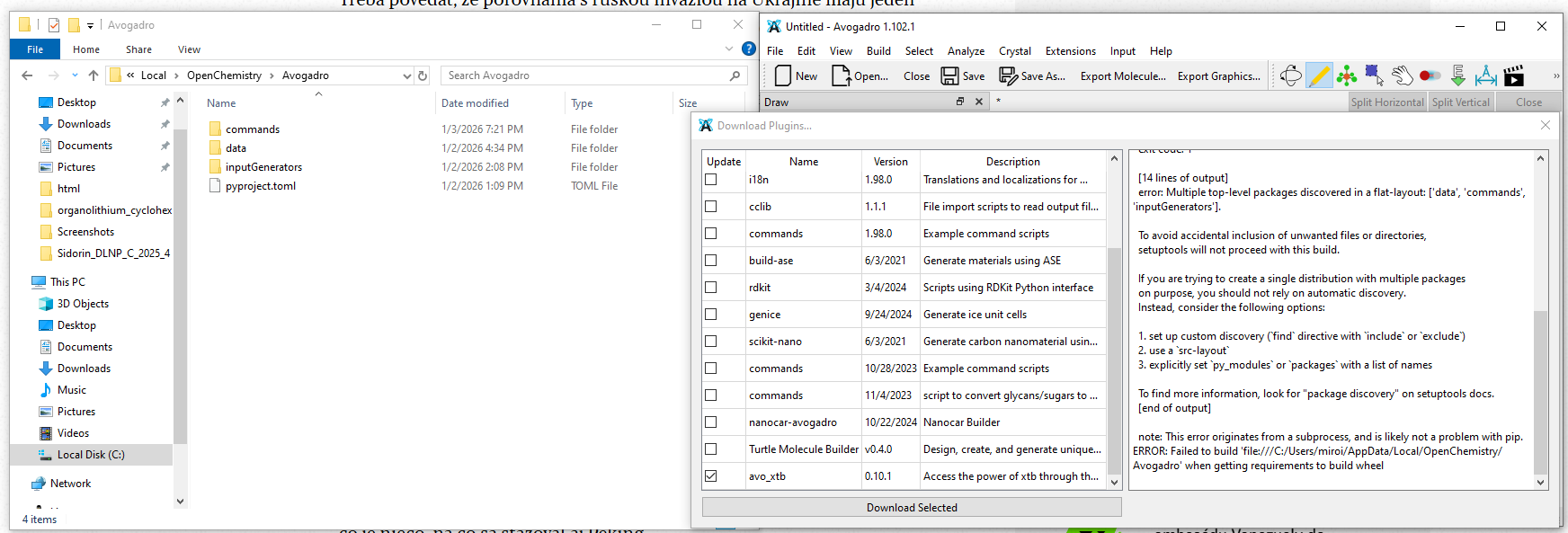
Upon downloading plugins I got this error:
Downloading avo_xtb.zip to C:/Users/miroi/AppData/Local/OpenChemistry/Avogadro

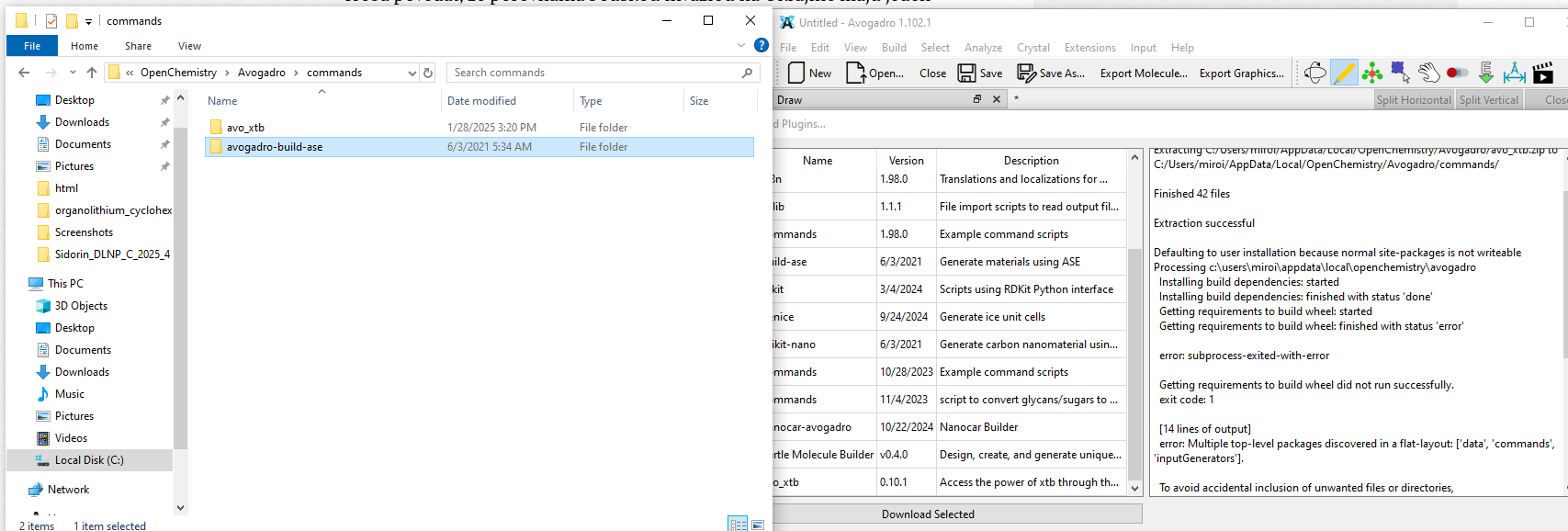
Extracting C:/Users/miroi/AppData/Local/OpenChemistry/Avogadro/avo_xtb.zip to C:/Users/miroi/AppData/Local/OpenChemistry/Avogadro/commands/

Finished 42 files

Extraction successful

Downloading molecules.zip to C:/Users/miroi/AppData/Local/OpenChemistry/Avogadro

Extracting C:/Users/miroi/AppData/Local/OpenChemistry/Avogadro/molecules.zip to C:/Users/miroi/AppData/Local/OpenChemistry/Avogadro/data/

Finished 899 files

Extraction successful

Defaulting to user installation because normal site-packages is not writeable
Processing c:\users\miroi\appdata\local\openchemistry\avogadro
  Installing build dependencies: started
  Installing build dependencies: finished with status 'done'
  Getting requirements to build wheel: started
  Getting requirements to build wheel: finished with status 'error'

  error: subprocess-exited-with-error

  Getting requirements to build wheel did not run successfully.
  exit code: 1

  [14 lines of output]
  error: Multiple top-level packages discovered in a flat-layout: ['data', 'commands', 'inputGenerators'].

  To avoid accidental inclusion of unwanted files or directories,
  setuptools will not proceed with this build.

  If you are trying to create a single distribution with multiple packages
  on purpose, you should not rely on automatic discovery.
  Instead, consider the following options:

  1. set up custom discovery (`find` directive with `include` or `exclude`)
  2. use a `src-layout`
  3. explicitly set `py_modules` or `packages` with a list of names

  To find more information, look for "package discovery" on setuptools docs.
  [end of output]

  note: This error originates from a subprocess, and is likely not a problem with pip.
ERROR: Failed to build 'file:///C:/Users/miroi/AppData/Local/OpenChemistry/Avogadro' when getting requirements to build wheel
It would help a lot to know what you were trying to do. You mentioned avo_xtb in the title, but the log mentions extracting the molecule set, which seems like it was successful.
Defaulting to user installation because normal site-packages is not writeable
Processing c:\users\miroi\appdata\local\openchemistry\avogadro
I’m guessing this was attempting to install avo_xtb but I don’t know. If you use a terminal and go to c:\users\miroi\appdata\local\openchemistry\avogadro what do you see?
1 Like
Hello,
somehow the installation failed, looking into details…
Downloading avo_xtb.zip to C:/Users/miroi/AppData/Local/OpenChemistry/Avogadro

Extracting C:/Users/miroi/AppData/Local/OpenChemistry/Avogadro/avo_xtb.zip to C:/Users/miroi/AppData/Local/OpenChemistry/Avogadro/commands/

Finished 42 files

Extraction successful

Defaulting to user installation because normal site-packages is not writeable
Processing c:\users\miroi\appdata\local\openchemistry\avogadro
  Installing build dependencies: started
  Installing build dependencies: finished with status 'done'
  Getting requirements to build wheel: started
  Getting requirements to build wheel: finished with status 'error'

  error: subprocess-exited-with-error

  Getting requirements to build wheel did not run successfully.
  exit code: 1

  [14 lines of output]
  error: Multiple top-level packages discovered in a flat-layout: ['data', 'commands', 'inputGenerators'].

  To avoid accidental inclusion of unwanted files or directories,
  setuptools will not proceed with this build.

  If you are trying to create a single distribution with multiple packages
  on purpose, you should not rely on automatic discovery.
  Instead, consider the following options:

  1. set up custom discovery (`find` directive with `include` or `exclude`)
  2. use a `src-layout`
  3. explicitly set `py_modules` or `packages` with a list of names

  To find more information, look for "package discovery" on setuptools docs.
  [end of output]

  note: This error originates from a subprocess, and is likely not a problem with pip.
ERROR: Failed to build 'file:///C:/Users/miroi/AppData/Local/OpenChemistry/Avogadro' when getting requirements to build wheel
and
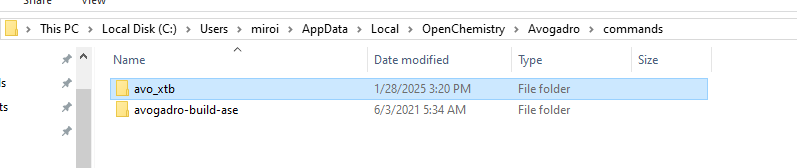
Well, I looked into these subdirectories, but I do not see any installation log or similar …
note: This error originates from a subprocess, and is likely not a problem with pip.
ERROR: Failed to build 'file:///C:/Users/miroi/AppData/Local/OpenChemistry/Avogadro' when getting requirements to build wheel
No, there isn’t an install log. That’s what you’re seeing in the window.
Since there’s a requirements.txt for avo_xtb then Avogadro is running pip install -f requirements.txt in that directory. You can try it yourself.