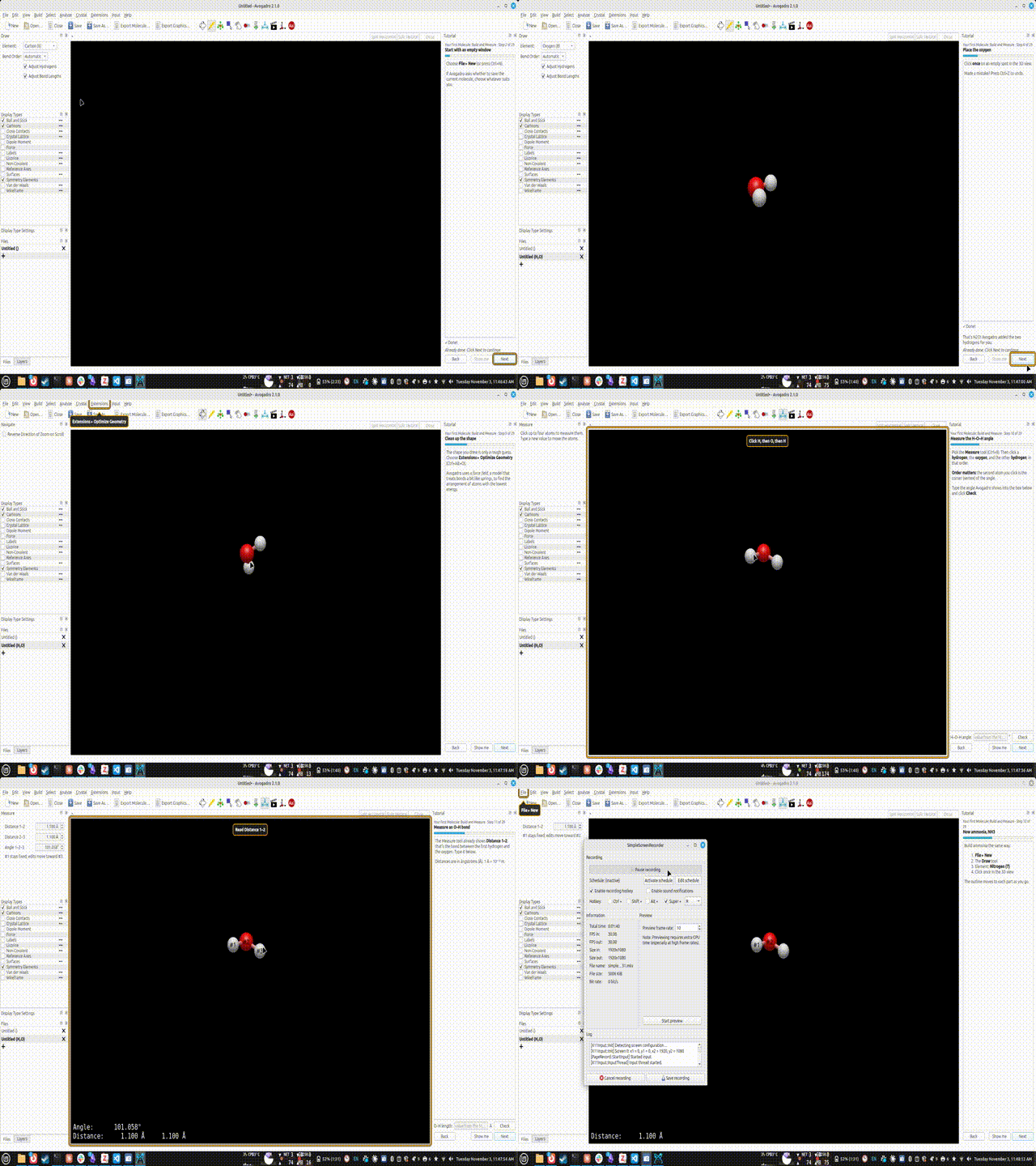
A student here is working with some colleagues to add “tutorials” - which would include UI highlighting (e.g., “switch to the measure tool”) and interactive questions.
I’d like some feedback in terms of syntax and the kinds of questions.
A panel shows what to do.
An orange outline points at the button or menu to use. (Color ideas?)
Each step moves on once the student has done it: picked the right tool, built the right molecule, run Optimize Geometry, or typed in a correct measurement.
A tutorial is a Markdown file
# is the tutorial’s title, and the paragraph after it is a short description.
Each ## heading starts a step. Its text is what the student reads.
A step can include a small do block that says what the student should do. The outline then points at each thing in turn, and the step checks itself.
Here is a complete, short tutorial:
# Bond Angles and Lone Pairs

Build ammonia and see how a lone pair squeezes the bond angle.

## Build ammonia

Start a new molecule, pick the {tool:draw}, choose **Nitrogen**, and click
once in the 3D view. Avogadro adds the hydrogens for you.

```do
new
tool draw
element N
set adjust-hydrogens on
build NH3 | Click once on an empty spot
  if H2O: That's water. Press {key:Undo}, choose Nitrogen (7), and click again.
  if 2 NH3: You've made two ammonia molecules. Press {key:Undo} to undo one.
```

## Clean up the shape

Choose {menu:optimize}. Avogadro uses a force field to find a sensible shape.

```do
optimize
```

## Measure the H–N–H angle

Pick the {tool:measure}, then click H, N, H **in that order**. The middle atom
is the corner of the angle. Type the angle you see in the box below.

```do
tool measure
measure angle H-N-H expect 100..108 record "Ammonia: H–N–H angle"
after: Ammonia's lone pair takes up more room than a bond, so the angle is
  a little smaller than a perfect tetrahedron (109.5°).
```

## Your results

Click **Copy results** to paste your measurements into your lab report.

```do
results
```
That’s the whole format. Anything outside a do block is ordinary Markdown, including bold, lists, tables, links and images. (Things like <sub> and <sup> are available, though I’m still thinking about full MathJax / LaTeX formulas.)
Here’s my idea about loading tutorials.. A pack is a folder of tutorials for a course or lab, e.g. as a new plugin type.
chem101-labs/
  pack.md                   title + the order of the tutorials
  01-getting-around.md
  02-vsepr.md
  02-vsepr.de.md            optional German translation
  images/lone-pairs.png
  molecules/caffeine.cjson
pack.md is just a title and a numbered list of links. (Maybe index.md instead?)
# CHEM 101 Lab Tutorials

University of Pittsburgh, Fall 2027.

1. [Getting around](01-getting-around.md)
2. [VSEPR shapes](02-vsepr.md)
Installing a pack:
Copy the folder into Avogadro’s tutorials folder, or use Install Tutorial Pack….
For a computer lab, IT can install a pack for every user, or point Avogadro at a shared network folder.
Later, packs should also install from the same Download Plugins dialog as plugins.
Packs are content only. They can’t run code, so a pack from a colleague is safe to open.
I like the idea, especially if the syntax dialect is set from the beginning (e.g. GitHub flavored Markdown, or CommonMark) for an inclusion as an entry to Avogadro’s help menu as well as a separate documentation (either two.avogadro, or separate instance e.g., with MkDocs).
I’m hesitant about the do tagged fenced blocks. For one, the example shared
```do
new
tool draw
element N
set adjust-hydrogens on
build NH3 | Click once on an empty spot
  if H2O: That's water. Press {key:Undo}, choose Nitrogen (7), and click again.
  if 2 NH3: You've made two ammonia molecules. Press {key:Undo} to undo one.
```
can be, dependent on environment/software, be (mis)understood as a code block in a programming language by the typical converters (pandoc, mkdocs, readthedocs).
For one, they then toggle on a non-proportional font.
Missing an ignore instruction, their stemmers may attempt to provide syntax highlighting where it is not sensible (as above).
Since do language is not yet known, manual intervention were necessary to prevent overly long lines in the source code (adjustable rule MD013 in e.g., in markdownlint)
Yet if student actions were plain lists of bullet points (both - and + are permitted characters), or ordered lists, such reformat could be provided automatically for instance as a pre-commit hook by mdformat e.g.
Detail on pack.md shared as preview: In ordered lists, the first ordinal implicitly defines the following ordinals, too. Thus
```md
1. apples
1. grapes
1. peaches

some text as place holder

4. pens
1. books
1. papers
```
yields
apples
grapes
peaches
some text as place holder
pens
books
papers
which is both understood by many Markdown engines (cf. markdownlint rule MD029) and saves much time when adjusting the sequence of lists (of tasks) in Markdown.
Yes, I think Markdown is the way to go. The student initially showed me a JSON format for each step.
Sure. It’s probably better to do that than numbering the filenames. And I’m leaning more to index.md since that’s what we use in the MyST website already.
I mean, it’s intended to be something of a syntax / scripting system. I’m okay with picking a different name or using bullet points, etc. The block is parsed by Avogadro to provide UI hints and validation forms.
In the example, it creates a new (empty) molecule, highlights the draw tool, then the element, etc.
One command per line. The student does them in order, and the outline moves along.
| text sets the label next to the outline. Every command has a sensible default label, so this is optional.
Indented if …: lines give hints for common mistakes. They work for:
a wrong molecule: if H2O:
a wrong measurement: if wrong-vertex:, if units:
after: is shown once the step is done.
Formulas can be written in any element order.H3N and NH3 are the same. (This avoids questions about \ce{H2CO3} vs. \ce{CH2O3}, etc.
All commands (draft)
Command
What the student does
new
File ▸ New (done when the window is empty)
tool draw, tool measure, tool navigate, …
Picks that tool
element N
Chooses that element in the Draw tool
bond-order single (or auto, double, triple)
Chooses that bond order
set adjust-hydrogens on
Sets that option
optimize
Runs Optimize Geometry
run insert-smiles (and other menu items)
Uses that menu item
build C2H6
Builds exactly that molecule
measure distance C-C expect 1.45..1.62
Measures a bond and types the value
measure angle H-O-H expect 99..108
Measures an angle (the middle atom is the corner) and types the value
look view
Nothing to check; they click Next
load molecules/caffeine.cjson
Avogadro opens a starting molecule that comes with the tutorial
results
Shows the table of their measurements
The expect range is what the value should be after optimizing. A student who measures a hand-drawn shape is told to optimize first. The answer checks also catch:
clicking the atoms in the wrong order
typing picometres instead of ångströms
Shortcuts and menu names in the text
Write these in curly braces in the step text. They are filled in from the running app, so they are always right for the student’s computer and language:
You write
A Mac user sees
A Windows user sees
{key:Undo}
⌘Z
Ctrl+Z
{tool:measure}
Measure tool (⌘8)
Measure tool (Ctrl+8)
{menu:optimize}
Extensions ▸ Optimize Geometry (⌥⌘O)
Extensions ▸ Optimize Geometry (Ctrl+Alt+O)
No more “Mac users: use ⌘ instead of Ctrl.”
I’ve been thinking about math / chemical formulas. A lot of this is okay because we have Unicode and <sub> and <sup> tags. It might be helpful to some to enable full LaTeX / MathJax and simply generate SVG in the pack.
that last point about one syntax for both makes a lot of sense to me, the if hints already read like a tiny scripting language anyway. reusing it would keep things simpler for anyone writing lessons, i think.
I don’t know that I want to commit to a syntax for scripting the UI just yet (particularly since many people ask about Python scripting and I think this feature calls for a different syntax)
At the very least, it sounds like there’s interest in this and a few things are clear:
Markdown + some form of “scripting syntax” is a preferred format
Having “packs” with a list of steps / lessons is a good idea, including possible images and files (e.g., pre-computed orbitals, spectra, etc.)
Any feedback as far as:
Menu location? (I’d probably suggest “Help ▸ Interactive Tutorials” since I’d eventually like to allow download of the website documentation for offline use